Home infusion software, from the pharmacy’s referral to the paid invoice.
Paloma Clinical runs a home infusion nursing agency in one record: specialty pharmacy referrals, orders, nurse scheduling, infusion visit notes, DON review, staff credentials and pharmacy invoices. It was built by a registered nurse and agency operator, from the daily work of a home infusion agency.
A Texas-based home infusion agency runs its daily operations on Paloma.
What Paloma is, and who it is for.
Paloma Clinical is operations software for home infusion nursing agencies. A referral from a specialty pharmacy becomes a patient and a governing order, the order becomes scheduled visits, the nurse charts the infusion on a phone, the Director of Nursing reviews the note, and the reviewed visit becomes a line on the pharmacy’s invoice.
It is for the agency that provides the nursing: the owner, the administrator, the DON, the scheduler, the biller and the nurses in the field. Home infusion is the care setting Paloma is used most deeply in today.
One price per agency covers every Clinical capability, with no per-user charges. The price is published, you can open a working demo agency without signing up, and you can create your agency yourself.
Paloma’s current commercial focus is home infusion and specialty pharmacy nursing. Paloma Cares is a broader healthcare operations platform, with Medicare-certified home health coming next and Paloma Talent providing workforce capabilities for eligible subscribers.
A home infusion agency runs on other people’s paper.
The pharmacy sends the referral and the order. The prescriber signs. The nurse documents. The pharmacy pays. When each of those lives in a different place, the agency finds out too late.
Referrals entered more than once
Every fax and portal download is typed again into a spreadsheet, a schedule and a chart, and details drift between the copies.
Orders disconnected from visits
A changed dose or frequency never reaches the schedule, so a visit happens against an order that is no longer current.
Credentials expire unnoticed
A licence, CPR card or competency lapses, and nobody knows until the nurse is already assigned to tomorrow’s infusion.
Nurses chase forms and instructions
The right note, the pharmacy’s requirements and the current order are in three different places when the nurse is at the bedside.
Completed visits that never bill
A finished visit with an unsigned or incomplete note never becomes billable work, and the money waits.
Survey problems found too late
Gaps surface when the surveyor asks, not when they could still be fixed.
Spreadsheets, group texts, paper notes and a general-purpose system.
Most infusion nursing agencies start the same way. Referrals arrive by fax and are logged in a spreadsheet. The schedule lives in a calendar. Orders are passed to nurses by text. Notes are written on paper or in a PDF, scanned, and emailed to the pharmacy. Invoices are typed at the end of the month from a stack of notes, and someone keeps a separate list of whose licence expires when.
That works for a handful of patients. It stops working when the agency adds a second pharmacy, a second market or a tenth nurse, because nothing connects the order to the visit or the visit to the invoice. The larger home-care systems connect more, but many are built around a different model of care and are priced by quotation.
Paloma was built from inside that problem. Each step hands the next one what it needs, so nobody re-keys a referral, chases a signature in a spreadsheet, or builds an invoice by hand.
One chain, from the pharmacy’s referral to a reconciled payment.
Each step reads the one before it.
Referral → order
AI reads the pharmacy’s referral packet and proposes the patient, the drug, dose, route and frequency, and the prescriber. Your intake staff confirm what becomes the governing order. The source document stays with the record.
Order → visits
The governing order sets the treatment course. Schedule single visits or multi-day courses, and see licence and competency status before assigning a nurse. A revised order is a new order, never an edit.
Visit → documentation
The nurse charts against the current order on a phone: patient verification, assessment, vascular access, pre-medications, the primary medication, education, supplies and signatures. The DON reviews, returns for correction, or approves.
Reviewed visit → invoice
Only reviewed, signed visits become invoice lines, at the rates in your contract with that pharmacy. Statements, resubmissions and payments are recorded against the same visits.
What your team does in Paloma, role by role.
Intake
Upload the referral as it arrives. Paloma proposes the patient, orders and prescriber for your intake staff to review.
Orders
Each order and each revision is kept, not overwritten, with prescriber signature status on every order and visits tied to the order that authorises them.
Scheduling
Turn current orders into visits. Find nearby eligible nurses and check staff readiness before assignment.
Field nursing
Today’s visits, the guided infusion note, notes returned for correction, credentials and pay, on the nurse’s phone. Mobile product tour →
Clinical review
A DON review queue for every submitted note: what needs a signature, what is incomplete, and what is cleared to bill.
Workforce
One file per nurse with licences, certifications and competencies. Expirations are surfaced before they block a visit.
Billing
Pharmacy invoices and statements from reviewed visits, receivables, payments, factoring and reconciliation. Corrections preserve the original record. Pharmacy workflows →
Survey readiness
Survey Binder and Survey Simulator, limited to authorized administrative roles, so readiness is built every day rather than the week before.
Staffing a new referral
With Paloma Talent, a referral in a town where you have no nurse becomes a search for prospects near the patient, from the chart. Paloma Talent →
Your pharmacy partners can see their side of the work.
Your pharmacy partners do not have to wait for an email. An agency administrator can give a pharmacy’s own staff role-based access to that pharmacy’s work with your agency: their patients and reviewed nursing notes for pharmacists, their patients and referrals for case managers, and invoices for billing contacts. A pharmacy sees its own relationship with your agency and nothing else. How the whole chain works →
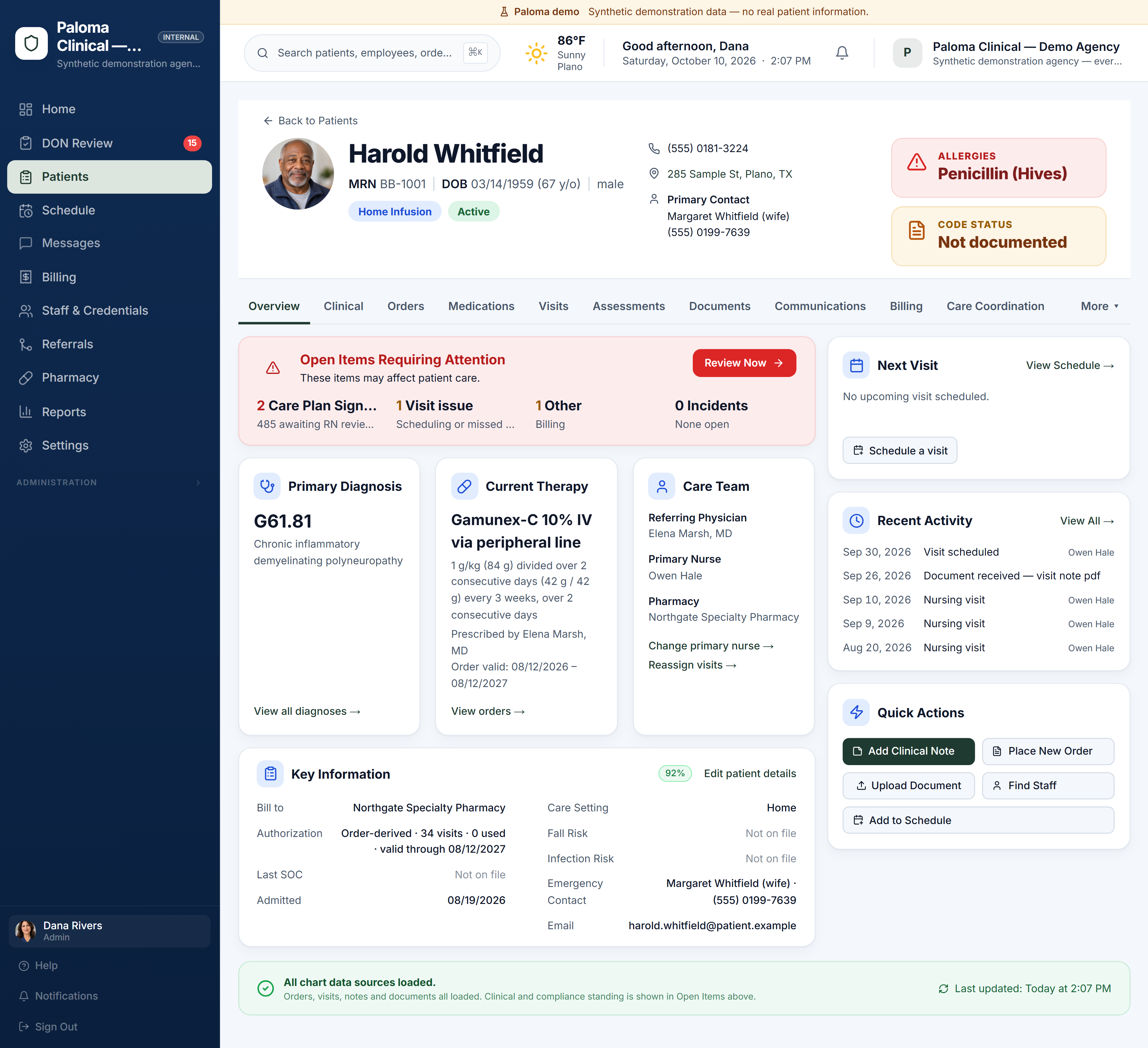
The patient chart an infusion agency works from.
Allergies and code status, what is open, the governing order, the care team, the next visit and recent activity, on one screen.
Who Paloma is for, and what it does not do yet.
A good fit
Nursing agencies that take infusion referrals from specialty pharmacies and invoice those pharmacies for nursing visits; agencies working with several pharmacies, each with its own documentation and billing requirements; agencies moving off paper, spreadsheets and texts.
Know before you buy
Paloma’s billing today is pharmacy invoices and statements, and UB-04 claims including VA Community Care. End-to-end electronic payer claim submission is not yet a completed Paloma workflow. If most of your infusion nursing is billed to commercial insurers or Medicare rather than to pharmacies, that matters to your decision.
Scope today
Paloma is the nursing agency’s system. It is not a pharmacy dispensing or compounding system. Medicare-certified home health is the next service line, coming soon.
Simple pricing. No feature tiers. No per-user charges.
One price per agency, monthly or annual. Create your agency yourself; we are here if you want help.
The complete Clinical product. Every Clinical capability included.
- Referral intake with AI document reading
- Orders and pharmacy workflows
- Scheduling
- Nurse charting and DON review
- Workforce readiness
- Billing and survey tools
$499 charged at checkout. Renews monthly.$4,990 charged at checkout. Renews annually.
Prefer help? Book a guided demo
Run the care and find the clinicians to deliver it. When a patient needs staffing, search from the patient chart: your own eligible staff first, then Paloma Talent prospects near the patient.
- Everything in Paloma Clinical
- Find Staff from the patient chart: your own eligible staff first, then Paloma Talent prospects near the patient
- Call, email or invite prospects straight from the staffing search; no patient-identifying details leave your agency
- No placement fee when you hire through Paloma Talent under this plan
$999 charged at checkout. Renews monthly.$9,990 charged at checkout. Renews annually.
Prefer help? Book a guided demo
Paloma Talent on its own has no monthly fee: a placement fee is earned only when a candidate we introduced accepts your offer. No hire, no fee. See Paloma Talent →
Home infusion software: what agencies ask.
What is home infusion software?
Home infusion software is the system a home infusion provider uses to manage patients, orders, nursing visits, documentation and billing. Paloma Clinical is home infusion software for the nursing agency: it takes the specialty pharmacy’s referral and order, schedules and documents the nursing visits, and invoices the pharmacy from reviewed visits.
Does Paloma work with more than one specialty pharmacy?
Yes. Paloma keeps each pharmacy’s documentation requirements, bill-to details and contract rates on that pharmacy’s record, so an agency that works with several pharmacies does not need a separate process for each.
Can nurses chart infusion visits on a phone?
Yes. The nurse’s phone shows today’s visits and a guided infusion note that saves as the nurse works. Agency administration, such as scheduling grids, the patient chart and billing, is a desktop workflow.
What does home infusion software from Paloma cost?
Paloma Clinical is one price per agency, with every Clinical capability included and no per-user charges. You can pay monthly or annually; annual saves two months. The current prices are in the table on this page and on the pricing page.
How does Paloma use AI?
AI reads referral documents and orders and proposes what it found.
How do I start?
Explore the demo agency first: it is a working Paloma with synthetic data and needs no sign-up. When you are ready, create your agency and sign your agreements, including a Business Associate Agreement before any patient information is added. Your first billing period is charged when you complete checkout. There is no trial.
Related: From referral to paid invoice · AlayaCare alternative · Pharmacy workflows · Specialty pharmacy nursing software · Software for nurse-owned agencies · All of Paloma Clinical
See your workflow in Paloma.
Explore the live demo agency now, or book a guided demo around your own referrals, pharmacies and staff.
The demo agency uses synthetic data; no credit card required · create your agency when you are ready (first billing period charged at checkout) · or talk to a person