Clinical work in the field.

See how nurses and agency teams use Paloma from a phone. These screens are built from the live product with synthetic data: every agency, nurse, patient, address and number is fictional.

Screens

Field nurse · Home

The nurse’s workday, in one place

Today’s visits, the visit in progress, notes that still need attention, file items and the current pay period, organized around what the nurse needs to do next.

  • Today’s visits with Start Visit and Open Visit
  • A visit in progress stays on top: Resume Visit or Clock Out
  • Tasks to finish: notes due and credentials that need a document
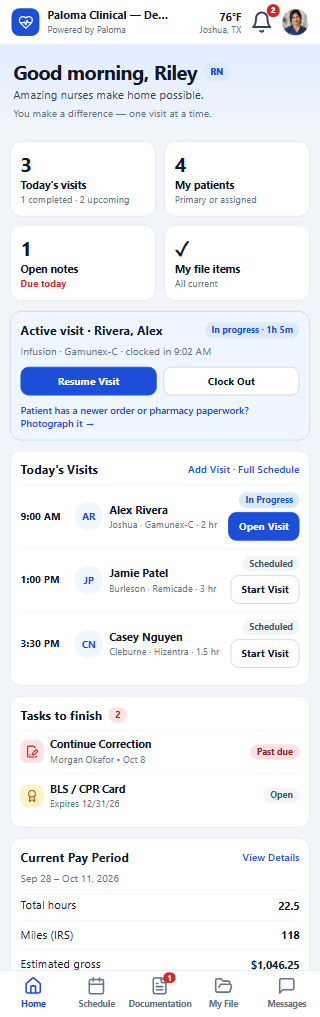
The nurse home screen on a phone: greeting, four counts, the active visit with Resume Visit and Clock Out, today’s visits, tasks to finish and the current pay period.
Field nurse · At the visit

Charting at the bedside, step by step

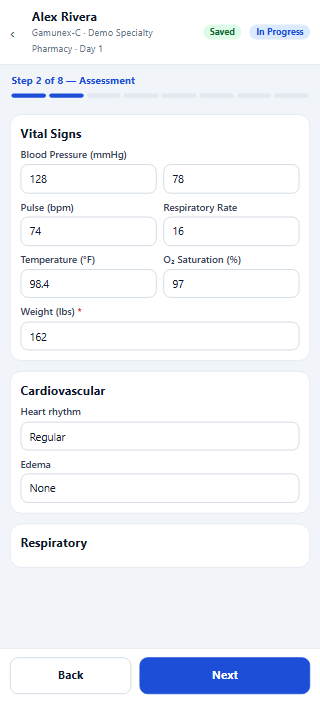
Opening a visit starts the guided note: patient verification, assessment, vascular access, pre-medications, primary medication, education and goals, supplies and signatures, saved as the nurse goes.

  • Eight steps, with the current step always shown
  • Saved as the nurse works; an unfinished note resumes where the nurse left off
  • When something is missing, the button names it before the note can be completed
Step 2 of 8, Assessment, on a phone: vital signs, cardiovascular and respiratory sections with Back and Next.
Field nurse · Documentation

Every note that still needs the nurse

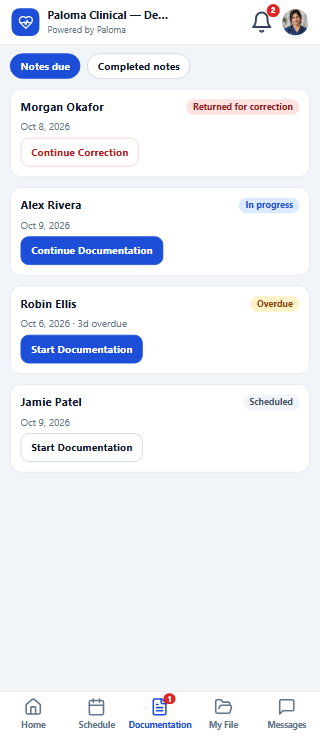
Notes due, in one list: returned for correction, in progress, overdue or scheduled, each with the one button that continues it.

  • Returned notes show Continue Correction
  • Overdue notes say how many days
  • Completed notes and visit history one tap away
The nurse’s notes due on a phone: a returned note, a note in progress, an overdue note and a scheduled visit.
Field nurse · My File

Credentials the nurse can keep current from a phone

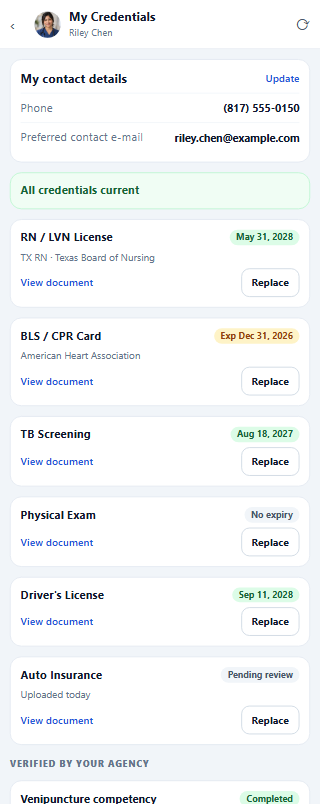
Licence, BLS, TB screening, physical, driver’s licence and auto insurance, each with its expiry. The nurse photographs and uploads a replacement; results the agency records are shown, never editable by the nurse.

  • Take a photo, choose from photos or choose a file
  • Expiring and expired items marked before they block a visit
  • Agency-verified results kept separate from uploads
My Credentials on a phone: contact details, all credentials current, six credential cards with expiry dates and a result verified by the agency.
Field nurse · Pay

Pay the nurse can check

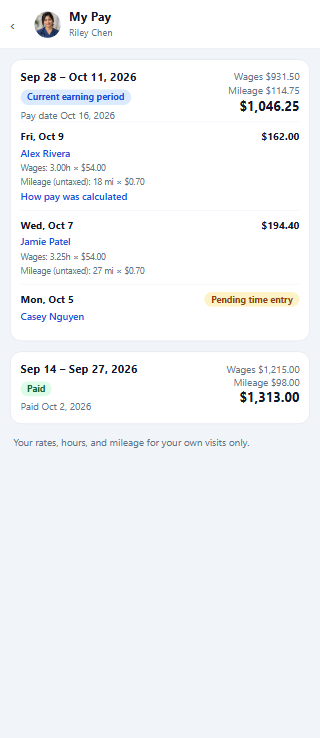
Each pay period with wages and mileage per visit, the pay date, and how each amount was calculated.

  • Current earning period and paid periods
  • Wages and mileage for each visit
  • Only the nurse’s own rates and visits
My Pay on a phone: the current earning period with wages, mileage and per-visit amounts, and a paid period.

Agency administration (scheduling grids, the patient chart, billing and reports) is a desktop workflow in Paloma; see the full Product Tour. More phone screens are added here as they are verified against the live product.

See your workflow in Paloma.

Explore the live demo agency now, or book a guided demo around your own referrals, pharmacies and staff.

The demo agency uses synthetic data, no card · create your agency when you are ready (first month charged at checkout)

Demo agencyBook a demo