Operations software for care delivered beyond the hospital.
Referrals, orders, scheduling, charting, staff readiness, billing and survey preparation, in one place. $499/month per agency, with every Clinical capability included.
Used most deeply today by home infusion and healthcare staffing agencies; built for home health, infusion suites, specialty pharmacy nursing, private duty nursing and VA Community Care too. Medicare home health is coming soon. Care settings →
Or explore the demo agency with synthetic data and no card.
Agency administration is a desktop workflow. Want to see Paloma on a phone? Explore the Mobile Product Tour →
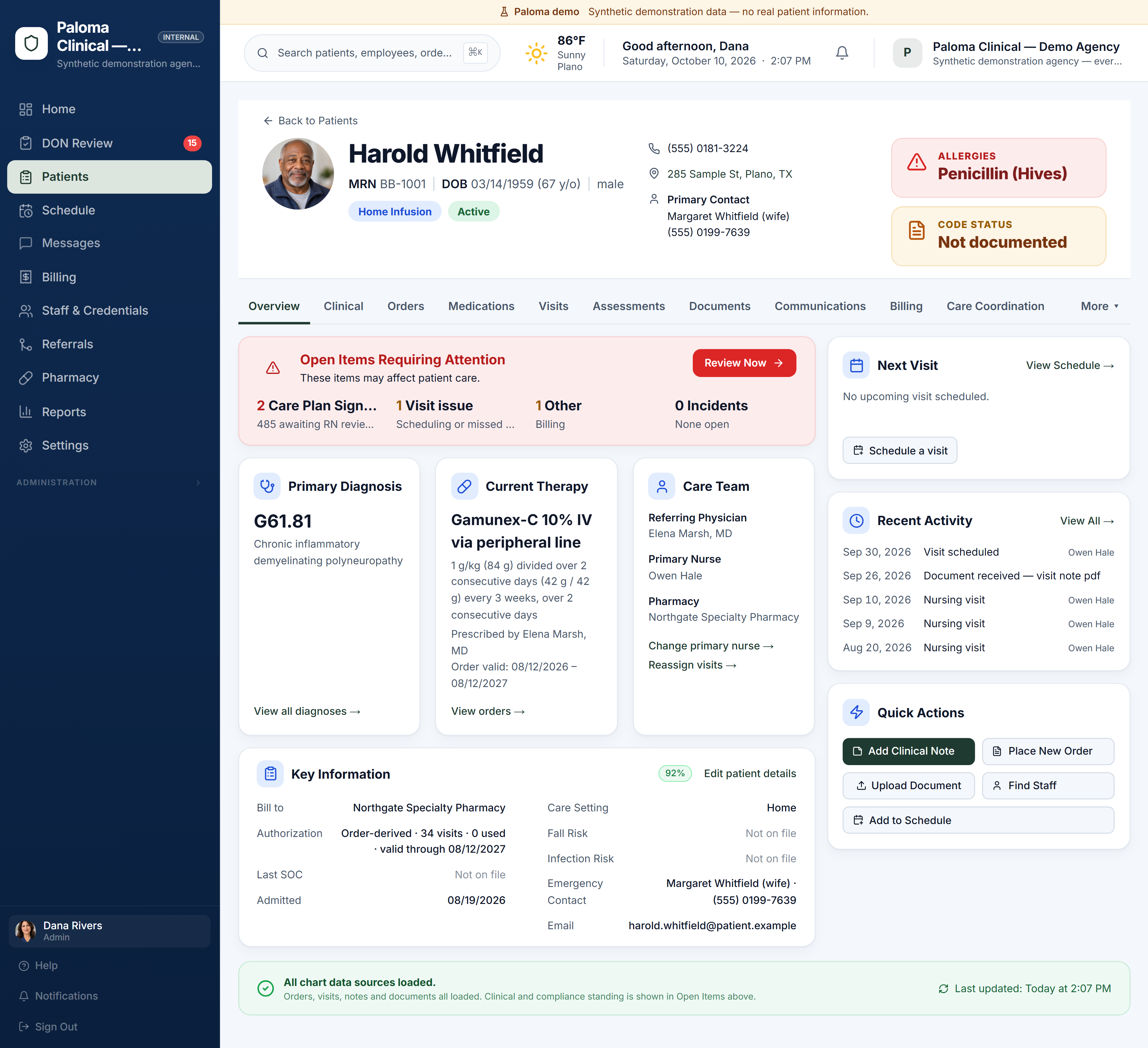
Six parts of the work, one record.
Referral intake
AI reads the referral packet and proposes the patient, orders and prescriber. Your intake staff confirm what becomes the record.
- Upload the referral as it arrives
- AI document reading proposes the patient, orders and prescriber
- Staff confirm before anything becomes part of the chart
- The source document stays with the record
Orders and pharmacy workflows
Pharmacy orders, their revisions and their signatures, tracked from receipt to the visits they authorise.
- Each order and each revision kept, not overwritten
- Prescriber signature status on every order
- Visits tied to the order that authorises them
- Visit documentation returned to the referring pharmacy
Scheduling
Turn current orders into visits. See licence and competency status before assigning a nurse.
- Single visits and multi-day courses
- Find nearby eligible nurses
- Check staff readiness before assignment
Nurse charting and DON review
Nurses chart the visit where it happens. The Director of Nursing reviews, returns for correction, or approves.
- Infusion visit notes built for the field
- A DON review queue for every submitted note
- Notes can be returned to the nurse for correction
Workforce readiness
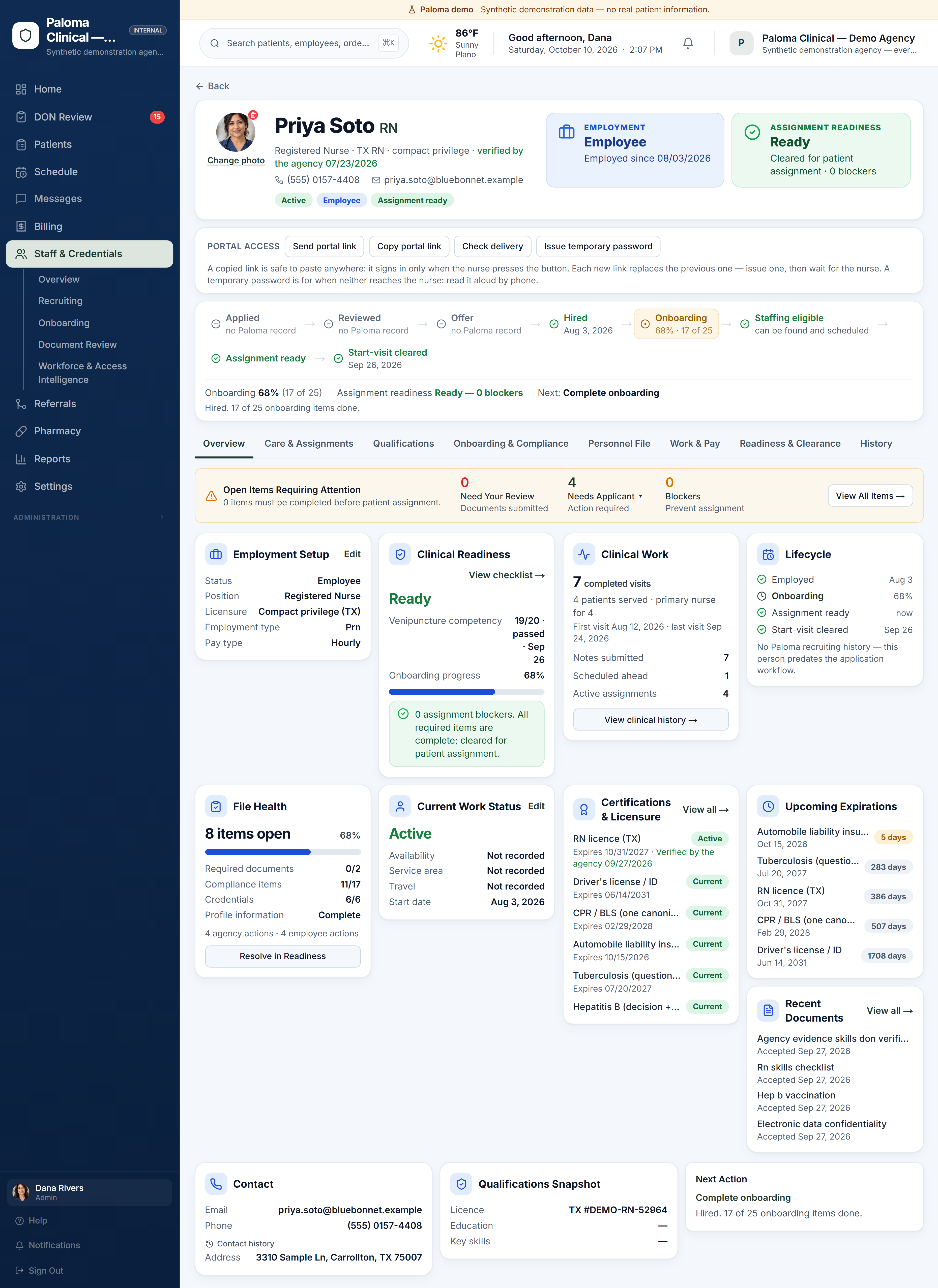
One workforce file for every nurse, so you know who is cleared to work today and what expires next.
- Licences, certifications and competencies in one file
- Expirations surfaced before they block a visit
- A clear answer to "who can I send?"
Billing and survey tools
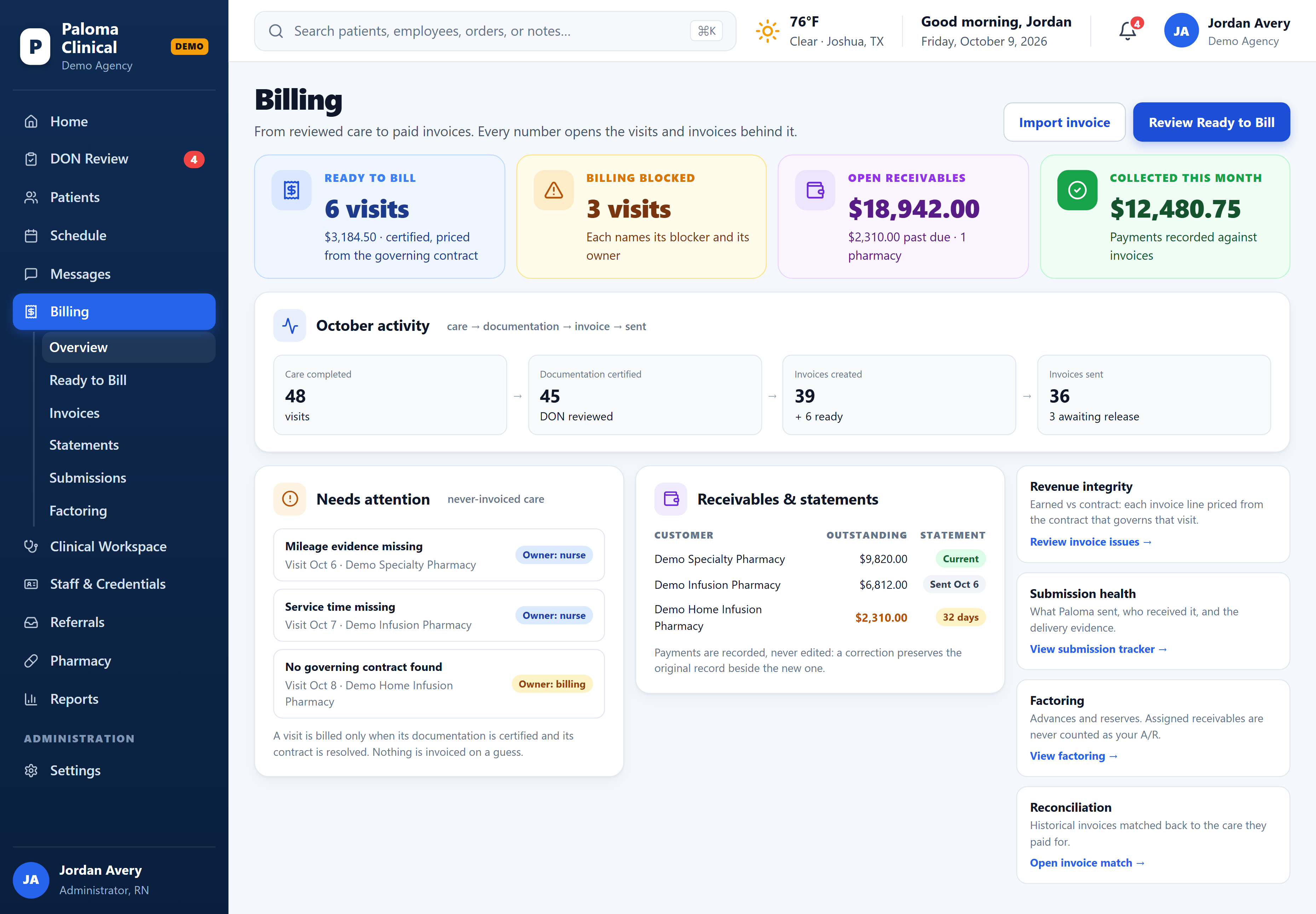
Invoice the pharmacy from reviewed visits, keep statements current, and prepare for survey every day instead of the week before.
- Pharmacy invoices and statements from reviewed visits
- Payments recorded; corrections preserve the original record instead of overwriting it
- Survey Binder and Survey Simulator, limited to authorized administrative roles
From reviewed care to payment.
Certified visits are priced from the contract that governs them and become pharmacy invoices. Anything that cannot be billed names its blocker and its owner; receivables, statements, payments, factoring and reconciliation sit beside it.
Agency administration is a desktop workflow. Want to see Paloma on a phone? Explore the Mobile Product Tour →
One file per clinician, from application to start-visit cleared.
Hiring, onboarding, competencies, licence and credentials, expirations and clinical work live in one workfile. Readiness is computed from what is on file, so “who can I send?” has an answer before the visit is scheduled.
Agency administration is a desktop workflow. Want to see Paloma on a phone? Explore the Mobile Product Tour →
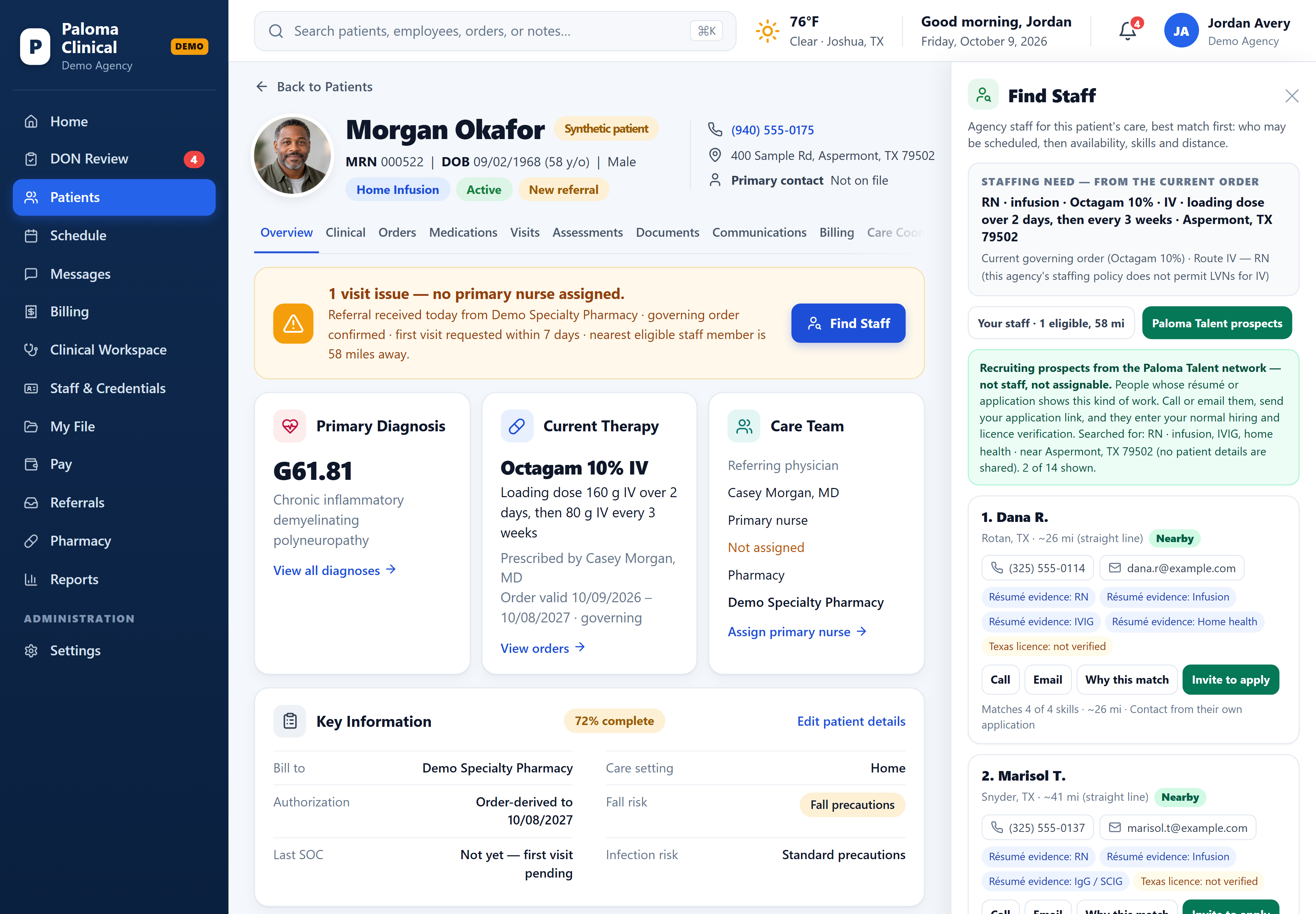
Know whether your team can cover a referral before you scramble.
When a referral comes in, Paloma turns the care requirements, schedule and service area into a staffing need. Find Staff checks your current workforce for people who are eligible, ready, available and nearby—so you can see who can cover the patient before starting a new recruiting search.
- Paloma understands the needFrom the referral or the patient’s current order: the therapy and route, how often, where the patient is, and which disciplines your agency permits for that kind of care.
- Your team is checked firstEvery clinician is checked against the same readiness Paloma enforces at scheduling—licence, required credentials and clearance—then ranked by availability, skills on file and distance.
- Straight into schedulingChoose a ready clinician and the visit opens with the patient and clinician already filled in. Anyone not ready shows exactly what is missing.
Agency administration is a desktop workflow. Want to see Paloma on a phone? Explore the Mobile Product Tour →
Included for every Clinical agency.
No feature tiers. These come with Paloma Clinical at no extra charge.
- Patient managementOne chart per patient with orders, visits, documents and history.
- UB-04 claimsIncluding VA Community Care claims. For administrators and billing staff.
- Survey BinderAssemble survey evidence. Limited to authorized administrative roles.
- Survey SimulatorRehearse a survey before it happens. Limited to authorized administrative roles.
- Daily Compliance BriefA daily summary of what needs attention. Your agency turns it on.
- Referral source analyticsSee where your referrals come from.
Simple pricing. No feature tiers.
Clinical is $499/month per agency. Add Talent with Clinical for $999/month—no placement fee when you hire.
The complete Clinical product. Every Clinical capability included.
- Referral intake with AI document reading
- Orders and pharmacy workflows
- Scheduling
- Nurse charting and DON review
- Workforce readiness
- Billing and survey tools
$499 charged at checkout. Renews monthly.$4,990 charged at checkout. Renews annually.
Prefer help? Book a guided demo
Run the care and find the clinicians to deliver it. When a patient needs staffing, search from the patient chart: your own eligible staff first, then Paloma Talent prospects near the patient.
- Everything in Paloma Clinical
- Find Staff from the patient chart: your own eligible staff first, then Paloma Talent prospects near the patient
- Call, email or invite prospects straight from the staffing search; no patient-identifying details leave your agency
- No placement fee when you hire through Paloma Talent under this plan
$999 charged at checkout. Renews monthly.$9,990 charged at checkout. Renews annually.
Prefer help? Book a guided demo
Paloma Talent on its own has no monthly fee: a placement fee is earned only when a candidate we introduced accepts your offer. No hire, no fee. See Paloma Talent →
See your workflow in Paloma.
Explore the live demo agency now, or book a guided demo around your own referrals, pharmacies and staff.
The demo agency uses synthetic data, no card · create your agency when you are ready (first month charged at checkout)