Software for IV Hydration and Mobile IV Nursing
One record for the client, the prescriber’s order, the schedule, the nurse’s credentials, the IV visit note and the Director of Nursing’s review. Built for nurse-led IV care given under an order, wherever the client is.
The demo agency is a working Paloma with synthetic data. No sign-up.
What Paloma is, and who it is for.
Paloma Clinical is operations software for nurse-led care outside the hospital, including ordered mobile IV nursing and IV hydration services. It is for organizations whose nurses give ordered IV therapy in homes, hotels, workplaces or other community settings.
You create the client record, record the order, assign a nurse whose license and competencies are current, and the nurse documents the visit on a phone. Every submitted note goes to the Director of Nursing for review. One price per agency covers every Clinical capability, with no per-user charges.
One platform for care delivered beyond the hospital, configured for the way your organization delivers care. The same Paloma that runs home infusion nursing runs mobile IV nursing: the client record, the order, the qualified nurse, the schedule, the visit, the documentation and the review are one operating record.
Paloma Cares is a broader healthcare operations platform, with Medicare-certified home health coming next and Paloma Talent providing workforce capabilities for eligible subscribers.
The nurse is skilled. The record is scattered.
The order is in someone’s inbox
The prescriber’s order for the client sits in an email or a photo, not beside the visit it governs.
The calendar does not know who is cleared
A booking calendar shows who is free. It does not show whose license or CPR card expired last week.
The IV note is a generic form
Site, gauge, attempts, lot number and expiry end up in a free-text box, or are not written down.
Nobody reviews the note
Notes are filed when the visit ends. Clinical review happens when someone asks.
A reaction with no trail
A side effect is handled at the visit and reported by phone, with no incident report and no record of who was told.
Supplies found missing at the door
What the last visit used and what the next one needs is not written anywhere the office can see.
Why generic scheduling software is not enough for nurse-led IV care.
Many mobile IV therapy teams run on a booking calendar, a form builder for the visit note, a shared drive for orders and a spreadsheet of nurse licenses. Each tool does its own job. None of them knows what the others hold.
A calendar can tell you a nurse is free at two o’clock. It does not tell you that the client has an order on file, that the nurse’s license and CPR are current, that venipuncture competency was passed, or that the last note was reviewed. IV therapy nursing is clinical work, and those are the questions a clinical leader has to answer.
Paloma keeps the client, the order, the schedule, the nurse’s file and the note in one record, so a visit is not assigned to a nurse who is not cleared to make it, and the note the nurse writes is the note the Director of Nursing reviews.
From the client record to the report, one record.
Client record
Create the client directly, with no pharmacy and no referral document. Paloma calls it a patient record. Referral intake with AI document reading and spreadsheet import are there when you need them.
Prescriber’s order
Record the prescriber’s order for the client: entered, uploaded or verbal. The order governs the visit. Orders can be held, discontinued and reconciled.
Nurse assignment
Schedule a single visit, a recurring visit or a series, and find nearby eligible staff. Assignment is blocked when the nurse’s license or CPR/BLS is missing or expired, a required competency such as venipuncture is not passed, onboarding is incomplete, or the nurse is not cleared by the Director of Nursing.
Supplies
Each visit note records the supplies used and the supplies needed next, so the office knows what the next visit calls for.
Mobile visit
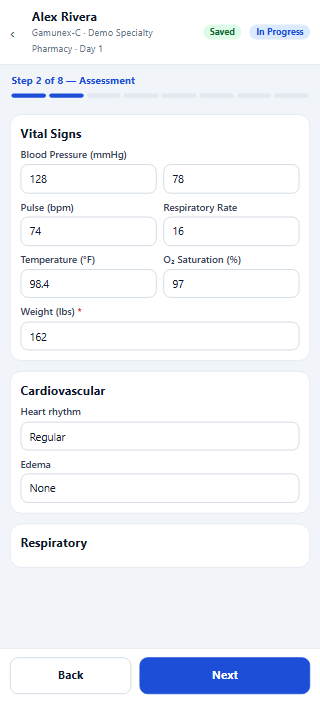
In the phone browser, the nurse sees today’s visits, clocks in and out, and opens a guided visit note that saves as the nurse works.
IV documentation
Vital signs in timed rows. Vascular access: device type, site, gauge, number of attempts, site assessment and dressing. Product given with dose or volume and unit, lot number and expiry, pre-medications and delivery method (pump, gravity or push).
Director of Nursing review
Every submitted note is reviewed. A note can be returned to the nurse for correction. A signed note is corrected by addendum, not edited.
Reports
Census, visit volume, visit completion, schedule coverage, nurse performance, incidents and staff readiness, with an audit history of changes for each visit.
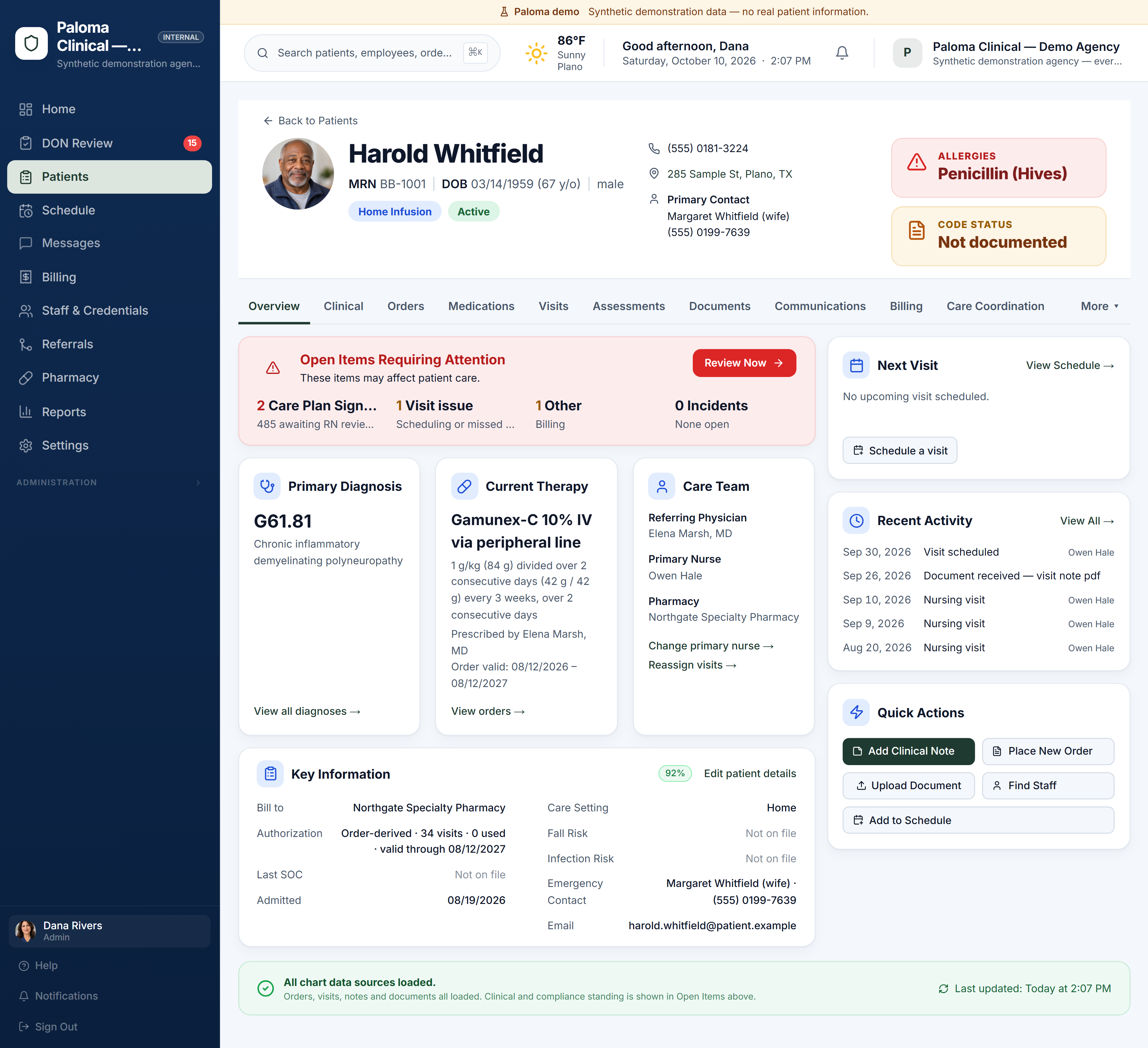
Agency administration is a desktop workflow. Want to see Paloma on a phone? Explore the Mobile Product Tour →
More screens: Product tour →
The visit note, in the nurse’s phone browser.
What the nurse records
The guided note also records the client’s response, side effects and adverse reactions with who was notified, and ends with two signatures: the client’s or their representative’s, and the nurse’s.
- Today’s visits, with clock in and clock out
- Vital signs as repeating timed rows
- Vascular access, product, lot number and expiry
- Supplies used and supplies needed next
- Signatures from the client or representative and the nurse
What the nurse sees in the field: Mobile product tour →
The rest of what a clinical leader needs.
One file per nurse
Licenses, certifications and competencies in one workforce file. Expiring credentials are tracked with reminders, and nurses can upload replacements from a phone.
The schedule
Week, month, day and list views. Recurring visits repeat every set number of days, weeks or months. Unassigned and overdue visits are flagged.
Incident reports
Adverse reactions, medication errors, falls, equipment failures, complaints and near misses, each with severity, status and resolution.
Staff messages and coordination notes
Staff message each other inside Paloma. A communications log on the client’s chart holds recorded coordination notes.
Agreements before patient information
Your agreements, including a Business Associate Agreement, are signed before any patient information is added. How Paloma handles patient information →
When you need more nurses
Paloma Talent helps agencies find clinicians when their own roster cannot cover a visit. See Paloma Talent →
Built for nurse-led care that goes to the client.
Mobile IV nursing teams
Organizations whose nurses give IV therapy in homes, hotels, workplaces and other community settings under the applicable prescriber order.
Nurse-led IV hydration services
Clinical leaders who want the order, the nurse’s credentials, the IV visit note and Director of Nursing review in one record.
Agencies that also do home infusion
Paloma’s visit note comes from infusion nursing: vascular access, product, lot number and expiry, monitoring and reactions. That depth is there for every IV visit your nurses make.
Simple pricing. No feature tiers. No per-user charges.
One price per agency, monthly or annual. Create your agency yourself; we are here if you want help.
The complete Clinical product. Every Clinical capability included.
- Referral intake with AI document reading
- Orders and pharmacy workflows
- Scheduling
- Nurse charting and DON review
- Workforce readiness
- Clinical oversight and survey tools
$499 charged at checkout. Renews monthly.$4,990 charged at checkout. Renews annually.
Prefer help? Book a guided demo
Run the care and find the clinicians to deliver it. When a patient needs staffing, search from the patient chart: your own eligible staff first, then Paloma Talent prospects near the patient.
- Everything in Paloma Clinical
- Find Staff from the patient chart: your own eligible staff first, then Paloma Talent prospects near the patient
- Call, email or invite prospects straight from the staffing search; no patient-identifying details leave your agency
- No placement fee when you hire through Paloma Talent under this plan
$999 charged at checkout. Renews monthly.$9,990 charged at checkout. Renews annually.
Prefer help? Book a guided demo
Paloma Talent on its own has no monthly fee: a placement fee is earned only when a candidate we introduced accepts your offer. No hire, no fee. See Paloma Talent →
IV hydration software: what nursing teams ask.
What should IV hydration software do for a nurse-led service?
It should keep the client record, the prescriber’s order, the schedule, each nurse’s credentials and the IV visit note in one place, and put every note in front of a clinical reviewer. Paloma Clinical does that, with the nurse’s part in the phone browser.
Can I add a client and schedule a visit without a pharmacy or a referral?
Yes. A client record can be created directly, with no pharmacy and no referral document, and a visit can be scheduled for that client as a single visit, a recurring visit or a series. Paloma calls the record a patient record.
What does the IV visit note record?
Vital signs in timed rows; vascular access, including device type, site, gauge, number of attempts, site assessment and dressing; the product given with dose or volume and unit, lot number and expiry; pre-medications and delivery method; the client’s response; side effects and adverse reactions with who was notified; supplies used and needed next; and the signatures of the client or representative and the nurse. Your agency adds its own products, for example fluids, to the drug list.
Do nurses need to install anything?
No. Nurses use Paloma in the phone browser: today’s visits, clock in and out, and the guided visit note. Agency administration is a desktop workflow.
What does Paloma cost?
Paloma Clinical is one price per agency, with every Clinical capability included and no per-user charges. You can pay monthly or annually; annual saves two months. The current prices are in the table on this page and on the pricing page.
How do I start?
Explore the demo agency first: it is a working Paloma with synthetic data and needs no sign-up. When you are ready, create your agency and sign your agreements, including a Business Associate Agreement before any patient information is added. Your first billing period is charged when you complete checkout. There is no trial.
Related: Concierge nursing software · All of Paloma Clinical · Finding nurses with Paloma Talent · Product tour · Security
See your workflow in Paloma.
Explore the live demo agency now, or book a guided demo around your own clients, visits and nursing team.
The demo agency uses synthetic data, no card · create your agency when you are ready (first month charged at checkout)